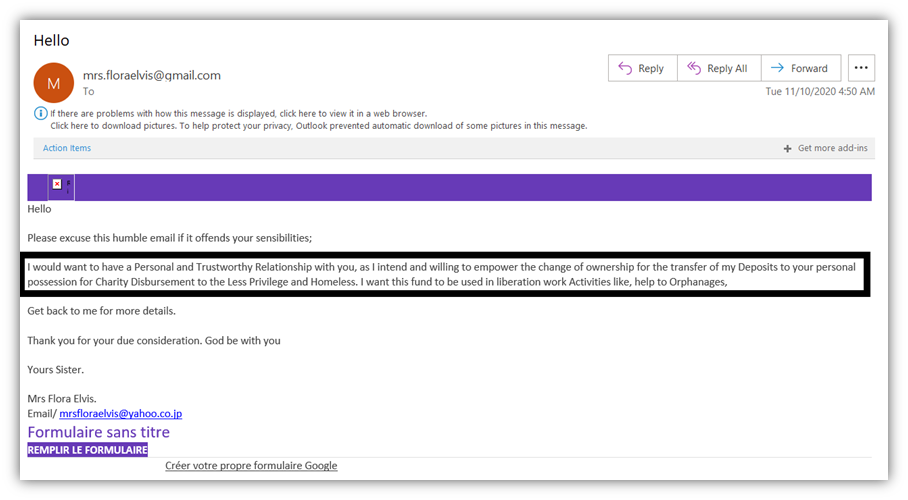
Scam emails have become much harder to identify. In the past, phishing messages were often easy to recognize because they contained obvious spelling mistakes, awkward sentences, strange formatting, or suspicious-looking promises. Today, that is no longer a reliable way to protect yourself.
With the growing use of artificial intelligence, scammers can create emails that sound professional, natural, and highly personalized. They may even include accurate information about a company, employee, customer, or ongoing project. As a result, knowing how to spot a scam email now requires looking beyond grammar and appearance.
Why Scam Emails Look More Real in 2026
Artificial intelligence has changed the way cybercriminals create phishing messages. AI can produce polished emails without the spelling and grammar problems that once exposed fraudulent messages. Both the UK’s National Cyber Security Centre and the FBI have warned that AI can make phishing attempts more convincing and personalized.
A scammer can also use publicly available information to make an email appear authentic. Company websites, social media profiles, professional networking pages, and press releases can provide enough information to create a believable message.
For example, an employee in a finance department might receive an email that appears to come from a familiar supplier. The message could mention a real project and request that an invoice be paid to a new bank account. Everything may look legitimate except for one important detail: the supplier never sent the email.
Don’t Rely on Spelling and Grammar
One of the most important lessons in modern email security is that perfect grammar does not mean an email is genuine.
For years, people were taught to look for spelling mistakes and unusual wording. While these can still be clues, scammers can now use AI tools to produce polished and professional messages.
A well-written email can still be malicious. Instead of asking yourself only, “Does this sound professional?” ask, “What does this person want me to do?”
That change in thinking can make it easier to identify sophisticated phishing attempts.
Pay Attention to What the Email Is Asking For
The request contained in an email is often more revealing than the writing style.
Be especially careful when a message asks you to:
- Send money or purchase gift cards
- Make a payment to a new bank account
- Change supplier banking information
- Provide your password or login details
- Share a verification or authentication code
- Submit personal or financial information
- Click an unexpected link
- Open an attachment you weren’t expecting
- Take immediate action because of a supposed emergency
These requests aren’t automatically fraudulent, but they deserve additional verification.
A useful rule is simple: slow down whenever an email involves money, passwords, security codes, or payment information.
Look Closely at the Sender’s Address
A familiar display name does not necessarily mean the email came from that person or organization.
For example, an email might display the name of your company’s director, but the actual address could belong to an unrelated domain. Scammers often rely on recipients noticing the familiar name without checking the complete email address.
Before responding to an unusual request, examine the sender’s address carefully. Look for subtle differences in spelling, unfamiliar domains, extra characters, or addresses that don’t match the organization.
However, even an apparently legitimate address should not automatically be trusted if the request itself is unusual.
Be Suspicious of Urgency
Scammers frequently try to prevent people from thinking carefully.
An email might claim that your account will be closed within minutes, a payment must be made immediately, or an important document needs to be opened before a deadline.
Urgency is a powerful psychological tactic because people are more likely to make mistakes when they feel pressured.
If an email says “act now,” take that as a reason to slow down rather than speed up.
Legitimate businesses may occasionally have urgent requests, but genuine urgency can still be verified through another trusted communication channel.
Verify Payment and Account Changes Separately
One of the most important protections for businesses is independent verification.
Suppose a regular supplier suddenly emails you saying that its bank details have changed. Don’t simply reply to the email and ask whether the change is genuine. Instead, contact the supplier using a phone number or contact method you already know to be legitimate.
The same principle applies to requests from managers, executives, customers, and colleagues.
Don’t use the phone number provided in a suspicious email. If the message itself is fraudulent, the contact information included in it could also be controlled by the scammer.
Be Careful With Links and Attachments
Unexpected links and attachments should always receive extra attention.
A link can lead to a fake login page designed to steal your password, while an attachment may contain malicious software.
Before clicking, consider whether you were expecting the message and whether the sender normally communicates with you in this way.
If you need to access an online account, it is often safer to open the organization’s website or official application directly rather than clicking a login link contained in an unexpected email.
Don’t Assume Your Spam Filter Will Catch Everything
Modern email security systems can block a large number of malicious messages, but they cannot identify every sophisticated phishing attempt.
A carefully written and personalized message may not contain obvious characteristics that trigger a security filter. This is especially true when the email resembles an ordinary business conversation.
That means email security tools should be treated as an important layer of protection, not the only line of defense.
Use Strong Authentication
Even if a scammer manages to obtain a password, additional security measures can make unauthorized access more difficult.
Organizations should consider phishing-resistant multi-factor authentication and passkeys where appropriate. These technologies can provide stronger protection than passwords alone.
For individuals, using unique passwords and enabling multi-factor authentication on important accounts can also reduce the damage caused by stolen credentials.
What to Do If You’re Unsure
When an email feels suspicious, don’t feel embarrassed about checking it.
Pause before clicking anything or responding. Contact the supposed sender through a trusted channel and ask whether the message is genuine. If you’re at work, report the email according to your organization’s security procedures.
It is much better to spend a few minutes verifying a legitimate message than to spend days recovering from a successful phishing attack.
Scam Emails Are Becoming Smarter
The biggest lesson from modern phishing attacks is that appearance can no longer be trusted on its own. A scam email may have perfect grammar, professional formatting, a familiar name, and details that appear completely accurate.
The most reliable defense is to examine the request.
If an email asks for money, passwords, verification codes, confidential information, or changes to payment details, stop and verify it independently. Don’t let urgency push you into making a decision before you’ve had time to think.
Final Thoughts
Learning how to spot a scam email that looks real is increasingly important as cybercriminals use more sophisticated technology. The old advice about looking for spelling mistakes is no longer enough.
Instead, focus on behavior: What is the email asking you to do? Is the request unexpected? Is there pressure to act immediately? Does it involve money, credentials, or sensitive information?
When something doesn’t feel right, pause and verify it through a trusted channel. That simple habit can prevent a convincing email from turning into a serious security problem.